tensorflow-nvJetson
TensorFlow builds, patches, and test scripts for NVIDIA Jetson TX1/TX2.
These instructions document legacy JetPack 3.2, 3.3, and 4.2 environments. Choose a wheel that matches your JetPack and Python versions; the packages below are not intended as a general installation guide for newer JetPack releases.
Setup Environment
# Setting in .bashrc or .zshrc or other bash
export PATH=/usr/local/cuda/bin:$PATH
export LD_LIBRARY_PATH=/usr/local/cuda/lib64:$LD_LIBRARY_PATH

$ sudo apt-get install libcupti-doc
export LD_LIBRARY_PATH=/usr/local/cuda/extras/CUPTI/lib64:$LD_LIBRARY_PATH

# Install python
$ sudo apt install python3 python3-dev
Install pip
$ wget https://bootstrap.pypa.io/get-pip.py -O get-pip.py
$ sudo python3 get-pip.py
Install numpy, keras
# requirements for numpy,keras
$ sudo apt install libhdf5-dev
$ sudo pip3 install numpy keras scipy
Install a Release Build
Download a compatible wheel from the Release Page.
The helper commands below download TensorFlow 1.12.0 for Python 3.5 (Linux aarch64). They do not install the wheel automatically.
Install by curl
sh -c "$(curl -fsSL https://tfjetson.peterlee0127.com/installTF.sh)"
Install by wget
sh -c "$(wget https://tfjetson.peterlee0127.com/installTF.sh -O -)"
After the download finishes, install the wheel using Python 3.5:
python3.5 -m pip install ./tensorflow-1.12.0-cp35-cp35m-linux_aarch64.whl
Download only the wheel you need; cloning the repository is not required for installation.
Use the NVIDIA Official Build (JetPack 3.3)
The following commands are historical examples for JetPack 3.3.
Python 2.7
pip install --extra-index-url=https://developer.download.nvidia.com/compute/redist/jp33 tensorflow-gpu
Python 3.5
pip3 install --extra-index-url=https://developer.download.nvidia.com/compute/redist/jp33 tensorflow-gpu
Verify the Installation
Run the GPU test that matches your installed TensorFlow major version from the repository root (use the Python interpreter where TensorFlow is installed):
# TensorFlow 1.x with Python 3
python3 tf-test/1.0/gpu.py

# TensorFlow 2.0 with Python 3
python3 tf-test/2.0/gpu.py
For a Python 2.7 wheel, use python2.7 tf-test/1.0/gpu.py. Check the device placement logs to confirm that operations run on the GPU. The TensorFlow 2.0 test also prints whether a GPU is available.
TensorRT
Install uff exporter for Jetson
TensorRT Test by TensorFlow
NVIDIA Jetson
JetPack 4.2, Tensorflow 2.0.0
2019 10/03
JetPack 3.3, TensorFlow 1.10
2018 8/13
- cuDNN v7.1.5
- CUDA 9.0
- Python 2.7 and Python 3.5
- TensorRT 4.0 GA
JetPack 3.2, TensorFlow 1.9
2018 7/11
- cuDNN 7.0
- CUDA 9.0
- Python 3.5
This package build with tensorRT.
JetPack 3.2, TensorFlow 1.8
2018 4/30.
- cuDNN 7.0
- CUDA 9.0
- Python 2.7
This package build with tensorRT.
JetPack 3.2, TensorFlow 1.7
2018 3/29.
- cuDNN 7.0
- CUDA 9.0
- Python 2.7
This package build with tensorRT.
JetPack 3.2, TensorFlow 1.6
- cuDNN 7.0
- CUDA 9.0
- Python 2.7
This package didn’t build with tensorRT.
JetPack 3.2, TensorFlow 1.5
- cuDNN 7.0
- CUDA 9.0
- Python 2.7
If you had this kind of Memory Error.
2018-02-23 16:45:13.345534: W ./tensorflow/core/common_runtime/gpu/pool_allocator.h:195] could not allocate pinned host memory of size: 267264.
2018-02-23 16:45:13.345585: E tensorflow/stream_executor/cuda/cuda_driver.cc:967] failed to alloc 240640 bytes on host: CUDA_ERROR_UNKNOWN.
2018-02-23 16:45:13.345634: W ./tensorflow/core/common_runtime/gpu/pool_allocator.h:195] could not allocate pinned host memory of size: 240640.
2018-02-23 16:45:13.345683: E tensorflow/stream_executor/cuda/cuda_driver.cc:967] failed to alloc 216576 bytes on host: CUDA_ERROR_UNKNOWN.
You can modify your tensorflow program. It should works.
config = tf.ConfigProto()
config.gpu_options.allow_growth = True

session = tf.Session(config=config, ...)
Install
Tensorflow 1.7.0
$ sudo pip install tensorflow-1.7.0-cp27-cp27mu-linux_aarch64.whl
Tensorflow 1.6.0
$ sudo pip install tensorflow-1.6.0-cp27-cp27mu-linux_aarch64.whl
Output of the test code
GPU Test
2017-07-26 17:21:02.457118: E tensorflow/stream_executor/cuda/cuda_gpu_executor.cc:879] could not open file to read NUMA node: /sys/bus/pci/devices/0000:00:00.0/numa_node
Your kernel may have been built without NUMA support.
2017-07-26 17:21:02.457263: I tensorflow/core/common_runtime/gpu/gpu_device.cc:955] Found device 0 with properties:
name: NVIDIA Tegra X2
major: 6 minor: 2 memoryClockRate (GHz) 1.3005
pciBusID 0000:00:00.0
Total memory: 7.67GiB
Free memory: 5.30GiB
2017-07-26 17:21:02.457343: I tensorflow/core/common_runtime/gpu/gpu_device.cc:976] DMA: 0
2017-07-26 17:21:02.457374: I tensorflow/core/common_runtime/gpu/gpu_device.cc:986] 0:   Y
2017-07-26 17:21:02.457407: I tensorflow/core/common_runtime/gpu/gpu_device.cc:1045] Creating TensorFlow device (/gpu:0) -> (device: 0, name: NVIDIA Tegra X2, pci bus id: 0000:00:00.0)
2017-07-26 17:21:02.457448: I tensorflow/core/common_runtime/gpu/gpu_device.cc:657] Could not identify NUMA node of /job:localhost/replica:0/task:0/gpu:0, defaulting to 0.  Your kernel may not have been built with NUMA support.
[[ 22.  28.]
 [ 49.  64.]]
test_tftrt.py
$ python test_tftrt.py
WARNING:tensorflow:From /usr/local/lib/python2.7/dist-packages/tensorflow/contrib/learn/python/learn/datasets/base.py:198: retry (from tensorflow.contrib.learn.python.learn.datasets.base) is deprecated and will be removed in a future version.
Instructions for updating:
Use the retry module or similar alternatives.
2018-04-02 11:25:15.649281: I tensorflow/stream_executor/cuda/cuda_gpu_executor.cc:865] ARM64 does not support NUMA - returning NUMA node zero
2018-04-02 11:25:15.649495: I tensorflow/core/grappler/devices.cc:51] Number of eligible GPUs (core count >= 8): 0
2018-04-02 11:25:15.657161: I tensorflow/contrib/tensorrt/convert/convert_nodes.cc:2624] Max batch size= 100 max workspace size= 33554432
2018-04-02 11:25:15.657245: I tensorflow/contrib/tensorrt/convert/convert_nodes.cc:2630] starting build engine
2018-04-02 11:25:19.985906: I tensorflow/contrib/tensorrt/convert/convert_nodes.cc:2635] Built network
2018-04-02 11:25:19.989301: I tensorflow/contrib/tensorrt/convert/convert_nodes.cc:2640] Serialized engine
2018-04-02 11:25:19.990305: I tensorflow/contrib/tensorrt/convert/convert_nodes.cc:2648] finished engine my_trt_op0 containing 7 nodes
2018-04-02 11:25:19.990493: I tensorflow/contrib/tensorrt/convert/convert_nodes.cc:2668] Finished op preparation
2018-04-02 11:25:19.990663: I tensorflow/contrib/tensorrt/convert/convert_nodes.cc:2676] OK finished op building
2018-04-02 11:25:20.027849: I tensorflow/core/common_runtime/gpu/gpu_device.cc:1344] Found device 0 with properties:
name: NVIDIA Tegra X2 major: 6 minor: 2 memoryClockRate(GHz): 1.3005
pciBusID: 0000:00:00.0
totalMemory: 7.67GiB freeMemory: 1.83GiB
2018-04-02 11:25:20.027937: I tensorflow/core/common_runtime/gpu/gpu_device.cc:1423] Adding visible gpu devices: 0
2018-04-02 11:25:20.027992: I tensorflow/core/common_runtime/gpu/gpu_device.cc:911] Device interconnect StreamExecutor with strength 1 edge matrix:
2018-04-02 11:25:20.028024: I tensorflow/core/common_runtime/gpu/gpu_device.cc:917]      0
2018-04-02 11:25:20.028050: I tensorflow/core/common_runtime/gpu/gpu_device.cc:930] 0:   N
2018-04-02 11:25:20.028165: I tensorflow/core/common_runtime/gpu/gpu_device.cc:1041] Created TensorFlow device (/job:localhost/replica:0/task:0/device:GPU:0 with 3926 MB memory) -> physical GPU (device: 0, name: NVIDIA Tegra X2, pci bus id: 0000:00:00.0, compute capability: 6.2)
2018-04-02 11:25:21.487230: I tensorflow/core/common_runtime/gpu/gpu_device.cc:1423] Adding visible gpu devices: 0
2018-04-02 11:25:21.488576: I tensorflow/core/common_runtime/gpu/gpu_device.cc:911] Device interconnect StreamExecutor with strength 1 edge matrix:
2018-04-02 11:25:21.488624: I tensorflow/core/common_runtime/gpu/gpu_device.cc:917]      0
2018-04-02 11:25:21.488659: I tensorflow/core/common_runtime/gpu/gpu_device.cc:930] 0:   N
2018-04-02 11:25:21.488788: I tensorflow/core/common_runtime/gpu/gpu_device.cc:1041] Created TensorFlow device (/job:localhost/replica:0/task:0/device:GPU:0 with 3926 MB memory) -> physical GPU (device: 0, name: NVIDIA Tegra X2, pci bus id: 0000:00:00.0, compute capability: 6.2)
2018-04-02 11:25:21.570046: I tensorflow/core/common_runtime/gpu/gpu_device.cc:1423] Adding visible gpu devices: 0
2018-04-02 11:25:21.570280: I tensorflow/core/common_runtime/gpu/gpu_device.cc:911] Device interconnect StreamExecutor with strength 1 edge matrix:
2018-04-02 11:25:21.570316: I tensorflow/core/common_runtime/gpu/gpu_device.cc:917]      0
2018-04-02 11:25:21.570337: I tensorflow/core/common_runtime/gpu/gpu_device.cc:930] 0:   N
2018-04-02 11:25:21.570446: I tensorflow/core/common_runtime/gpu/gpu_device.cc:1041] Created TensorFlow device (/job:localhost/replica:0/task:0/device:GPU:0 with 3926 MB memory) -> physical GPU (device: 0, name: NVIDIA Tegra X2, pci bus id: 0000:00:00.0, compute capability: 6.2)
2018-04-02 11:25:21.628937: I tensorflow/core/grappler/devices.cc:51] Number of eligible GPUs (core count >= 8): 0
2018-04-02 11:25:21.635393: I tensorflow/contrib/tensorrt/convert/convert_nodes.cc:2624] Max batch size= 100 max workspace size= 33554432
2018-04-02 11:25:21.635480: I tensorflow/contrib/tensorrt/convert/convert_nodes.cc:2628] Using FP16 precision mode
2018-04-02 11:25:21.635507: I tensorflow/contrib/tensorrt/convert/convert_nodes.cc:2630] starting build engine
2018-04-02 11:25:22.054581: I tensorflow/contrib/tensorrt/convert/convert_nodes.cc:2635] Built network
2018-04-02 11:25:22.056254: I tensorflow/contrib/tensorrt/convert/convert_nodes.cc:2640] Serialized engine
2018-04-02 11:25:22.056768: I tensorflow/contrib/tensorrt/convert/convert_nodes.cc:2648] finished engine my_trt_op1 containing 7 nodes
2018-04-02 11:25:22.056962: I tensorflow/contrib/tensorrt/convert/convert_nodes.cc:2668] Finished op preparation
2018-04-02 11:25:22.057143: I tensorflow/contrib/tensorrt/convert/convert_nodes.cc:2676] OK finished op building
2018-04-02 11:25:22.075579: I tensorflow/core/grappler/devices.cc:51] Number of eligible GPUs (core count >= 8): 0
2018-04-02 11:25:22.081608: I tensorflow/contrib/tensorrt/convert/convert_nodes.cc:2410] finished op preparation
2018-04-02 11:25:22.081704: I tensorflow/contrib/tensorrt/convert/convert_nodes.cc:2418] OK
2018-04-02 11:25:22.081732: I tensorflow/contrib/tensorrt/convert/convert_nodes.cc:2419] finished op building
2018-04-02 11:25:22.112265: I tensorflow/core/common_runtime/gpu/gpu_device.cc:1423] Adding visible gpu devices: 0
2018-04-02 11:25:22.112386: I tensorflow/core/common_runtime/gpu/gpu_device.cc:911] Device interconnect StreamExecutor with strength 1 edge matrix:
2018-04-02 11:25:22.112424: I tensorflow/core/common_runtime/gpu/gpu_device.cc:917]      0
2018-04-02 11:25:22.112452: I tensorflow/core/common_runtime/gpu/gpu_device.cc:930] 0:   N
2018-04-02 11:25:22.112562: I tensorflow/core/common_runtime/gpu/gpu_device.cc:1041] Created TensorFlow device (/job:localhost/replica:0/task:0/device:GPU:0 with 3926 MB memory) -> physical GPU (device: 0, name: NVIDIA Tegra X2, pci bus id: 0000:00:00.0, compute capability: 6.2)
2018-04-02 11:25:22.199192: I tensorflow/core/common_runtime/gpu/gpu_device.cc:1423] Adding visible gpu devices: 0
2018-04-02 11:25:22.199323: I tensorflow/core/common_runtime/gpu/gpu_device.cc:911] Device interconnect StreamExecutor with strength 1 edge matrix:
2018-04-02 11:25:22.199350: I tensorflow/core/common_runtime/gpu/gpu_device.cc:917]      0
2018-04-02 11:25:22.199375: I tensorflow/core/common_runtime/gpu/gpu_device.cc:930] 0:   N
2018-04-02 11:25:22.199478: I tensorflow/core/common_runtime/gpu/gpu_device.cc:1041] Created TensorFlow device (/job:localhost/replica:0/task:0/device:GPU:0 with 3926 MB memory) -> physical GPU (device: 0, name: NVIDIA Tegra X2, pci bus id: 0000:00:00.0, compute capability: 6.2)
2018-04-02 11:25:22.239846: W tensorflow/contrib/tensorrt/log/trt_logger.cc:34] DefaultLogger Int8 support requested on hardware without native Int8 support, performance will be negatively affected.
2018-04-02 11:25:22.626763: I tensorflow/contrib/tensorrt/convert/convert_graph.cc:298] Starting Calib Conversion
2018-04-02 11:25:22.627250: I tensorflow/contrib/tensorrt/convert/convert_graph.cc:310] Num Calib nodes in graph= 1
2018-04-02 11:25:23.703319: I tensorflow/core/common_runtime/gpu/gpu_device.cc:1423] Adding visible gpu devices: 0
2018-04-02 11:25:23.703421: I tensorflow/core/common_runtime/gpu/gpu_device.cc:911] Device interconnect StreamExecutor with strength 1 edge matrix:
2018-04-02 11:25:23.703452: I tensorflow/core/common_runtime/gpu/gpu_device.cc:917]      0
2018-04-02 11:25:23.703475: I tensorflow/core/common_runtime/gpu/gpu_device.cc:930] 0:   N
2018-04-02 11:25:23.703567: I tensorflow/core/common_runtime/gpu/gpu_device.cc:1041] Created TensorFlow device (/job:localhost/replica:0/task:0/device:GPU:0 with 3926 MB memory) -> physical GPU (device: 0, name: NVIDIA Tegra X2, pci bus id: 0000:00:00.0, compute capability: 6.2)
Pass
Tensorflow 1.7(build with TensorRT) is larger than 100MB. I split the whl file to 2 part. Please use following command to merge file.
merge file
$ cat tensorflow-1.7.0-cp27-cp27mu-linux_aarch64.whl.part-* > tensorflow-1.7.0-cp27-cp27mu-linux_aarch64.whl
split file
$ split -b 70m tensorflow-1.7.0-cp27-cp27mu-linux_aarch64.whl tensorflow-1.7.0-cp27-cp27mu-linux_aarch64.whl-part-
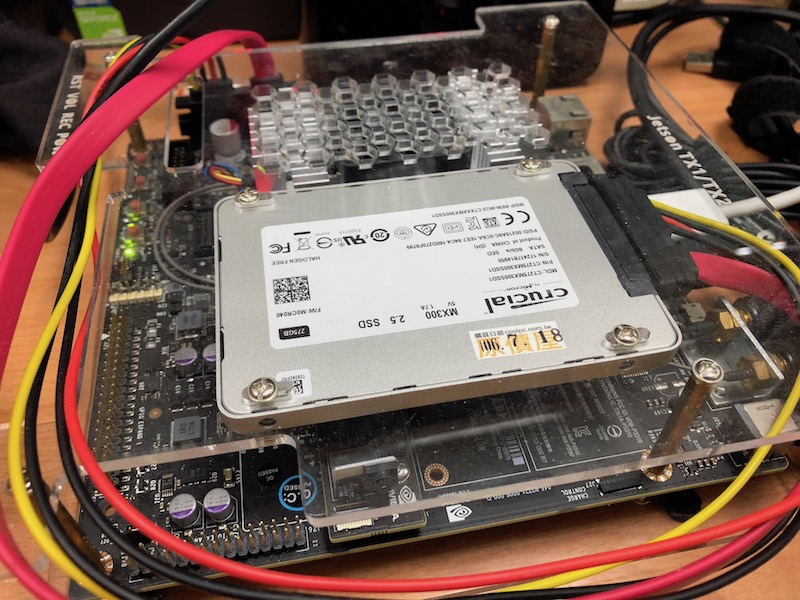
Install System on SSD (Solid State Disk)
You can find information at jetsonhacks.
jetsonhacks-install-samsung-ssd-on-nvidia-jetson-tx1